1.19. Mobile Device Sale
Introduction
Mobile device sale transaction can be performed with cardholder data or with card reference, previously made with card verification process or in previous transfer/sale transactions.
See terms definitions in Glossary.
Sale Flow
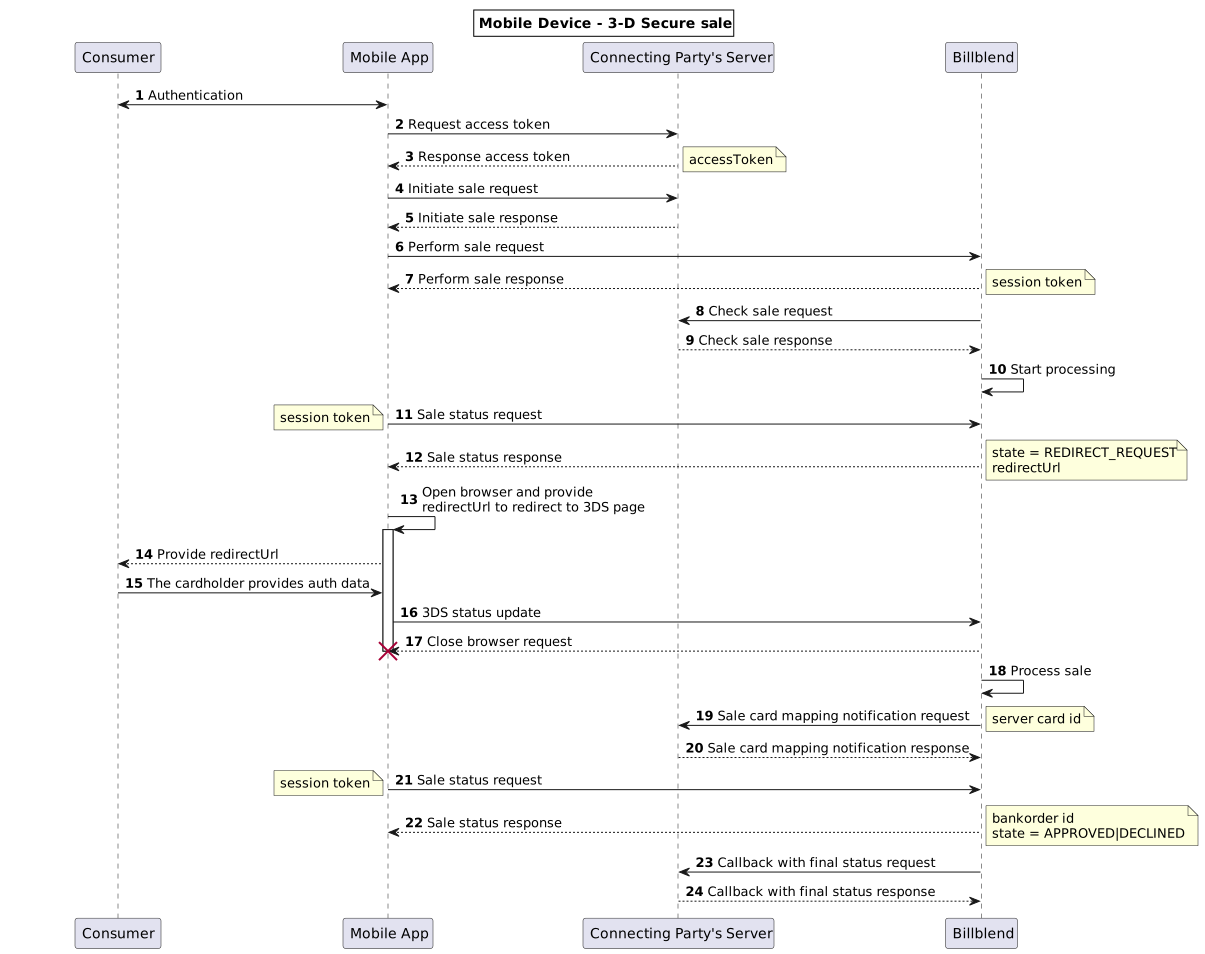
(1,2,3) To perform authentication of Consumer in Connecting Party’s app, Connecting Party can use any method which fits best to his needs. As a result, Connecting Party’s server generates {accessToken} and provides it to Connecting Party’s app. This parameter will be used to start and continue session.
(4,5) To initiate sale, Connecting Party’s app sends {accessToken} with transaction amount and other device parameters to Connecting Party’s server, which are used to start a session with unique random {nonce} and encrypted {signature}. To implement initiate sale request see Initiate Sale.
(6,7) On this stage Connecting Party’s app sends cardholder, device, session data and other parameters straight to Billblend to perform sale transaction. To implement perform sale request see Perform sale.
(8,9) Check sale is used for security purposes and allows Billblend to compare the data sent by Connecting Party’s app with the data stored on Connecting Party’s server. To implement check sale request see Check Sale.
(11,12,21,22) Sale status request is made by Connecting Party’s app to Billblend to get the status of sale transaction.To implement sale status request see Sale status.
(19,20) Billblend sends Sale card mapping notification request to Connecting Party’s server/proxy with created on its side card reference – {serverCardId}. To implement sale card mapping notification request see Sale card mapping notification.
(23,24) If Connecting Party callback URL is specified on endpoint level, Payment Gateway sends message to this callback URL whenever transaction reaches final status, no matter if the result is approved, declined or has other final status. See more in Callbacks.
Repeat Sale Flow
After successful Card mapping procedure, new sale transactions with the same cardholder data can be done easier for Consumer.
Connecting Party’s app makes new sale requests using {clientCardId} instead of cardholder data. Billblend sends this {clientCardId} to Connecting Party’s server in “Check sale request” and gets mapped to it {serverCardId} in “Check sale response” from Connecting Party’s server. This {serverCardId} is used to continue the processing of sale transaction.
Transaction flow remains the same: Initiate Sale -> Perform sale -> Check Sale.
If there is no need to change Consumer’s data (such as address, phone, etc.), “Perform sale request” for Repeat sale may be sent without any optional parameters. If Consumer’s data has to be changed, new source card reference must be created.
If {clientCardId} is used in “Perform sale request”, {serverCardId} must be included in “Check sale response” and signature.
If {clientCardId} was mapped to {serverCardId} in transaction with included {consumer.email} value, new “Perform sale request” and “Check sale response” with this {clientCardId} must also contain the same {consumer.email} value.
For Repeat Sale Flow use the following parameters in Perform Sale request:
- {sourceOfFunds.reference.clientCardId}
- {sourceOfFunds.reference.securityCode}
Instead of:
- {sourceOfFunds.card.expiry.month}
- {sourceOfFunds.card.expiry.year}
- {sourceOfFunds.card.holder}
- {sourceOfFunds.card.holder.firstName}
- {sourceOfFunds.card.holder.lastName}
- {sourceOfFunds.card.number}
- {sourceOfFunds.card.securityCode}
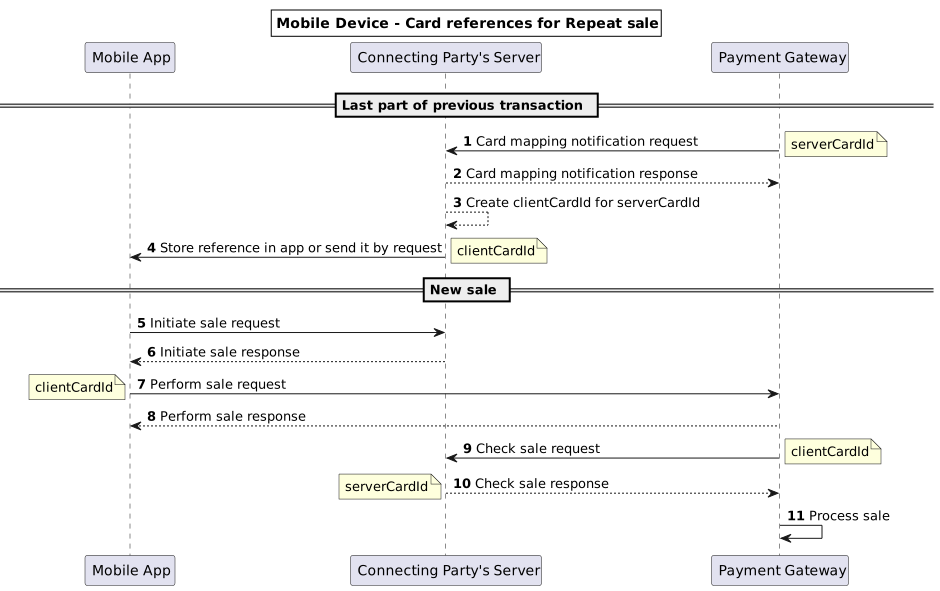
(1,2) Billblend sends Sale card mapping notification request to Connecting Party’s server/proxy with created on its side card reference – {serverCardId}. To implement sale card mapping notification request see Sale card mapping notification.
(5,6) To initiate sale, Connecting Party’s app sends {accessToken} with transaction amount and other device parameters to Connecting Party’s server, which are used to start a session with unique random {nonce} and encrypted {signature}. To implement initiate sale request see Initiate Sale.
(7,8) On this stage Connecting Party’s app sends cardholder, device, session data and other parameters straight to Billblend to perform sale transaction. To implement perform sale request see Perform sale.
(9,10) Check sale is used for security purposes and allows Billblend to compare the data sent by Connecting Party’s app with the data stored on Connecting Party’s server. To implement check sale request see Check Sale.