1.18. Bank transfer with Invoice
Introduction
This Use-Case describes how Connecting Party can issue invoices for Swift or similar wire bank transfer systems in Payment Gateway and display these invoices to Payers. Incoming bank transfer statuses might be updated automatically or manually.
See terms definitions in Glossary.
Bank Wire Transfer Flow
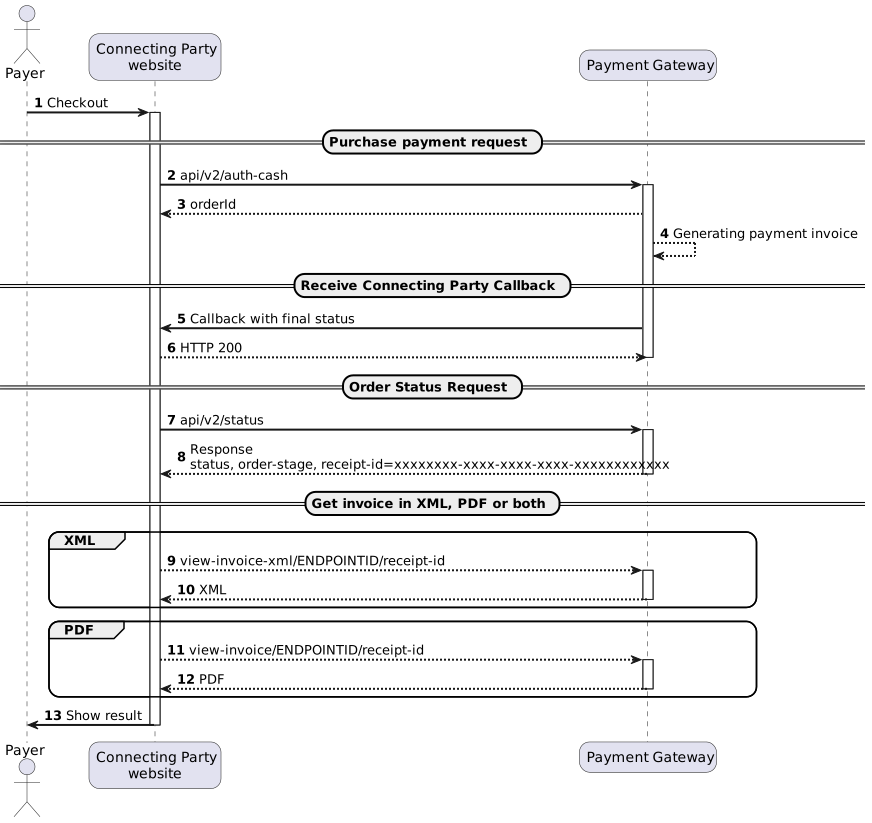
(2) To implement bank transfer request see /api/v2/auth-cash/.
(5,6) To implement order status request see /api/v2/status/. Status should be requested multiple times with 3-5 seconds interval until final status will be received in response. receipt-id will be received in status response.
(7) To implement callback with final status handling see Connecting Party.
(9) To implement view-invoice-xml request see /view-invoice-xml/. receipt-id will be used to get invoice in XML format.
(11) To implement view-invoice request see /view-invoice/. receipt-id will be used to get invoice in PDF format.
Simple Bank Transfer Flow Statuses
| Stage name | Description |
|---|---|
| AUTH_APPROVED | Invoice was issued for the Payer. |
| CANCEL_APPROVED | Payer didn’t complete the transfer. This stage is optional and may be used for better transaction control in back-office. |
| CAPTURE_APPROVED | Funds were transferred to the Connecting Party account (settled). |
| VOID_APPROVED | Funds were returned by the Payer (recalled). |
| REVERSAL_APPROVED | Funds were returned to the Payer by Connecting Party. |
Extended Bank Transfer Flow Statuses
| Stage name | Description |
|---|---|
| AUTH_STARTING | Transaction was initiated. |
| AUTH_INVOICED | Invoice was issued for the Payer. It may be downloaded in back-office, sent to Payer by e-mail or requested via API. |
| AUTH_SENT | Payer informed the Connecting Party that invoice have been paid. This stage may be skipped. |
| CANCEL_APPROVED | Payer didn’t complete the transfer. This stage is optional and may be used for better transaction control in back-office. |
| AUTH_APPROVED | Transfer was received by the bank. |
| CAPTURE_APPROVED | Funds were transferred to the Connecting Party account (settled). |
| VOID_APPROVED | Funds were returned by the Payer (recalled). |
| REVERSAL_APPROVED | Funds were returned to the Payer by Connecting Party. |
| CHARGEBACK_APPROVED | Funds were charged back by the Payer. |