1.6. Preauth Form, Capture and Cancel
Introduction
Preauthorization is a transaction type in which bank blocks the specified amount in the Payer’s card account and does not allow the cardholder to use this blocked money. It is important to know that the block remains for a definite period of time depending on whether this is a debit or a credit card (usually the maximum block period is 7 days for debit cards and 28 days for credit cards). Preauth Form integration allows Connecting Party to exclude itself from storing, processing, or transmitting Payer’s cardholder data or other sensitive payment details. Such data is submitted by Payer on Billblend hosted payment form in PCI DSS certified environment.
Capture is a transaction followed after preauth which deducts the locked amount from Payer’s card.
Cancel is opposite of Capture which cancels the deduction and returns locked amount back to Payer’s card.
All forms can be customized. Follow the Forms Customization reference to see examples and macros of Payment Page Customization, Prefilled Cardholder Data in Payment Page, Wait Page Customization and Finish Page Customization.
See terms definitions in Glossary.
Preauth Form Flow
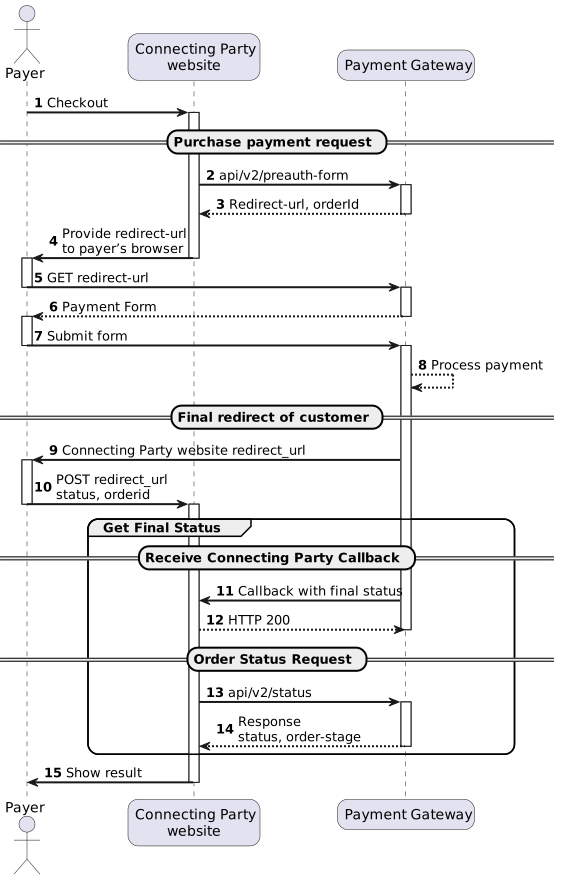
(2) To implement preauth-form request see /api/v2/preauth-form/.
(9) To implement final redirect see Final Redirect.
(11,12) To implement order status request see /api/v2/status/. Status should be requested multiple times with 3-5 seconds interval until final status will be received in response.
(13) To implement callback with final status handling see Connecting Party.
Capture Flow
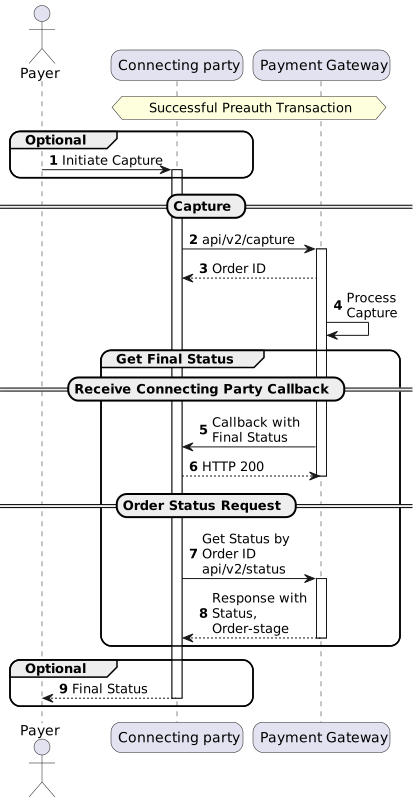
(1) Capture can be initiated by Connecting Party based on internal business model or Payer’s request.
(2) To implement capture request see /api/v2/capture/.
(5) Callback for Capture will be sent only if notify_url was provided in initial transaction request or additional callback URL for Capture transactions is specified on the endpoint level. If server_callback_url was provided in initial transaction request, callback for Capture will not be sent. To implement callback with final status handling see Connecting Party Callbacks.
(7) To implement order status request see /api/v2/status/. Status should be requested multiple times with 3-5 seconds interval until final status will be received in response.
(9) Final Status can be sent by Connecting Party based on internal business model or by Payer’s request.
Cancel Flow
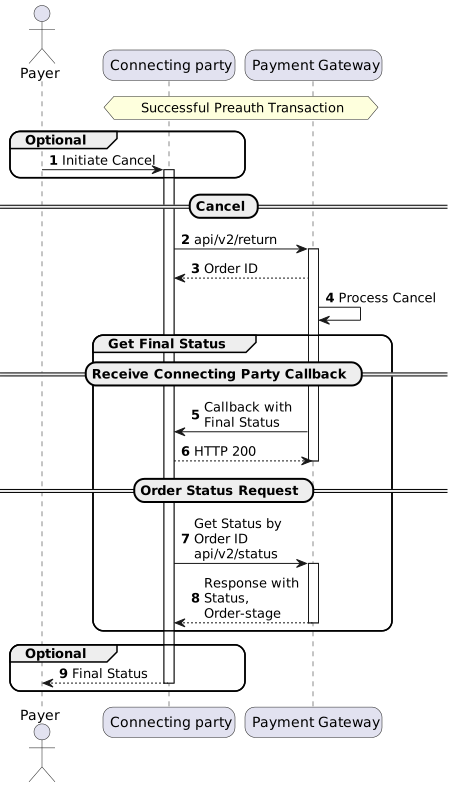
(1) Cancel can be initiated by Connecting Party based on internal business model or Payer’s request.
(2) To implement cancel request see /api/v2/return/.
(5) Callback for Cancel will be sent only if notify_url was provided in initial transaction request or additional callback URL for Cancel transactions is specified on the endpoint level. If server_callback_url was provided in initial transaction request, callback for Cancel will not be sent. To implement callback with final status handling see Connecting Party Callbacks.
(7) To implement order status request see /api/v2/status/. Status should be requested multiple times with 3-5 seconds interval until final status will be received in response.
(9) Final Status can be sent by Connecting Party based on internal business model or by Payer’s request.