
5.3. Forms Customization
Payment Page Display Logic
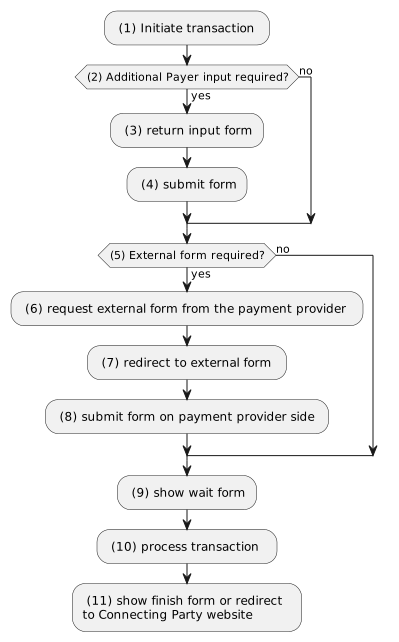
(1) Transactions can be initiated with API requests, batch upload or via Virtual terminal on UI. Each payment method has its own payment page display logic.
Note
Payment Cashier might have multiple transactions initiated within the same payment session, because it can have multiple payment methods available for the Payer. When Payer selects payment tab, respective auxiliary transaction is initiated. See Payment Cashier Page Customization.
(3) For credit card payment method form is displayed on Payment Gateway side and can be customized. See Payment Page Customization. Some other payment methods may have additional forms on Payment Gateway side. Contact Billblend support for details.
(7) Some payment methods require the Payer to be redirected to their own form. That form is not hosted by Payment Gateway and can`t be customized.
(9) Until transaction reaches final status, Payment Gateway displays Wait Form for the Payer.
(11) After the transaction reaches the final status, Payment Gateway displays Finish Form for the Payer or Redirect to Connecting Party website.
Payment Page Customization
Payment Page Example
<html>
<head>
<script type="text/javascript">
  function isCCValid(r){var n=r.length;if(n>19||13>n)return!1;
    for(i=0,s=0,m=1,l=n;i<l;i++)d=parseInt(r.substring(l-i-1,l-i),10)*m,s+=d>=10?d%10+1:d,1==m?m++:m--;
    return s%10==0?!0:!1}
</script>
</head>
<body>
<h3>Order #$!MERCHANT_ORDER_ID - $!ORDERDESCRIPTION</h3>
<h3>Total amount: $!AMOUNT $!CURRENCY to $!MERCHANT</h3>
<form action="${ACTION}" method="post">
  <div>Cardholder name: <input name="${CARDHOLDER}" type="text" maxlength="64"/></div>
  <div><label for="cc-number">Credit Card Number</label> <input id="cc-number" name="${CARDNO}" type="text" maxlength="19" autocomplete="cc-number"/></div>
  <div>Card verification value: <input name="${CVV2}" type="text" maxlength="4" autocomplete="off"/></div>
  <div>
    Expiration date:
    <select class="expiry-month" name="${EXPMONTH}" size="1" autocomplete="cc-exp-month" >
      <option value="01">January</option><option value="02">February</option><option value="03">March</option>
      <option value="04">April</option><option value="05">May</option><option value="06">June</option>
      <option value="07">July</option><option value="08">August</option><option value="09">September</option>
      <option value="10">October</option><option value="11">November</option><option value="12">December</option>
    </select>
      <select class="expiry-year" id="cc-exp-year" name="${EXPYEAR}" size="1" autocomplete="cc-exp-year">
      ${EXPIRE_YEARS}
    </select>
  </div>
  <div><label for="dest-number">Destination card number:</label> <input id="dest-number" name="${DESTINATIONCARDNO}" type="text" maxlength="19" autocomplete="off"/></div>
  $!{INTERNAL_SECTION}
  #if($!card_error)
  <div style="color: red;">$!card_error</div>
  #end
  <input name="submit" onclick="return isCCValid(document.getElementById('cardnumber').value);" type="submit" value="Pay"/>
</form>
</body>
</html>
Note
The code described below allows to submit destination card data in Transfer type transactions:
<div><label for="dest-number">Destination card number:</label>
<input id="dest-number" name="${DESTINATIONCARDNO}" type="text" maxlength="19" autocomplete="off"/></div>
Payment Page Autofill
If Connecting Party wants to use autofill in payment form, certain element attributes <id> <autocomplete> <label for> should be hardcoded in the following manner:
<label for="cc-number">Credit Card Number</label><span class="form-label-comment">The 13-19 digits on the front of your card</span>
<input class="card-number-field" id="cc-number" name="${CARDNO}" type="text" maxlength="19" autocomplete="cc-number" />
If autofill in the transfer form must be used, certain element attributes <id> <autocomplete> <label for> should be hardcoded in the following manner:
#if ($INPUT_SOURCE_CARD_CARDHOLDER)
<!-- Card printed name field -->
<li class="form-li">
    <label class="form-label" for="cc-name">Card printed name:</label>
    <input class="form-name-field" id="cc-name" name="${CARDHOLDER}" type="text" maxlength="50" autocomplete="cc-name" value="${CARDHOLDER_VALUE}"/>
</li>
#end
#if ($INPUT_SOURCE_CARD_CVV2)
<!-- CVV field -->
<li class="form-li">
    <label class="form-label" for="${CVV2}">Card security code (CVV2/CVC2):</label>
    <input class="form-cvv-field" name="${CVV2}" id="${CVV2}" type="password" maxlength="4" autocomplete="off"/>
</li>
#end
#end
#if ($INPUT_DESTINATION_CARD)
<!-- Destination Card Number field -->
#if($!DESTINATIONCARDNO)
<li class="form-li">
    <label class="form-label" for="${DESTINATIONCARDNO}">Destination card number:</label>
    <input class="form-number-field" id="${DESTINATIONCARDNO}" name="${DESTINATIONCARDNO}" type="text" maxlength="19" autocomplete="off"/>
</li>
#end
#end
Billblend has default payment form template which supports autocomplete. In case if Connecting Party wants to add additional fields for autocomplete, this specification should be used for naming references.
Payment Page Template Macros
| Field Name Macro | Field Value Macro | Description |
|---|---|---|
| ${APPLE_PAY} | n/a | Apple Pay buy button will be available if this macros is used. Not available for Transfer transactions. |
| ${GOOGLE_PAY} | n/a | Google Pay buy button will be available if this macros is used. Not available for Transfer transactions. |
| ${CARDNO} | ${CARDNOVALUE} | Payer’s credit card number. |
| ${EXPMONTH} | n/a | Credit card expiration month. |
| ${EXPYEAR} | n/a | Credit card expiration year. |
| ${CVV2} | ${CVV2VALUE} | Card security code. Example: 432 |
| ${CARDHOLDER} | ${CARDHOLDER_VALUE} | Card printed name. |
| ${MERCHANT} | n/a | End point display name. |
| ${SKIN_VERSION} | n/a | CSS skin version. |
| ${ORDERDESCRIPTION} | n/a | Order description. |
| ${CUSTOMER_FIRST_NAME} | n/a | Payer first name sent by Connecting Party via input parameters. |
| ${CUSTOMER_LAST_NAME} | n/a | Payer last name sent by Connecting Party via input parameters. |
| ${CUSTOMER_EMAIL} | n/a | Payer E-mail address sent by Connecting Party via input parameters. |
| ${DESTINATION_CARD_TYPE} | n/a | Destination card type. Available for Transfer transactions. |
| ${DESTINATION_LAST_FOUR_DIGITS} | n/a | Destination card last four digits. Available for Transfer transactions. |
| ${AMOUNT} | n/a | Amount. |
| ${CURRENCY} | n/a | Currency. |
| ${DESTINATION_PURPOSE} | n/a | Purpose sent by Connecting Party via input parameters. |
| ${PAYNET_ORDER_ID} | n/a | Billblend order id. |
| ${MERCHANT_ORDER_ID} | n/a | Connecting Party order id. |
| ${refresh_interval} | n/a | Refresh interval recommended by system. |
| ${uuid} | n/a | Internal. |
| ${INTERNAL_SECTION} | n/a | Internal for iFrame integration. |
| ${CUSTOMER_IP_COUNTRY_ISO_CODE} | n/a | Payer country defined by IP Address. |
| ${PREFERRED_LANGUAGE} | n/a | Payer language sent by Connecting Party via input parameters. Not available for Account Verification. |
| ${BROWSER_LANGUAGE} | n/a | Payer language defined by browser settings. |
| ${CUSTOMER_LANGUAGE} | n/a | Payer language send by Connecting Party via input parameters or defined by browser settings if first is not set. |
| ${MERCHANT_FORM_DATA} | n/a | Parameters sent in MERCHANT_FORM_DATA API parameter are parsed into macros with the same name, the parameter is url-encoded, example: testparam%3Dtest1%26mynewparam%3Dtest2 and is parsed into $MFD_testparam = test1 and $MFD_mynewparam = test2 macros in the form. Parameter name characters[a-zA-Z0-9], parameter value characters[a-zA-Z0-9], control characters [=&], 2MB max size. Not available for Account Verification. For example, this parameter can be used to display payment form in light/dark mode depending on the value passed by Connecting Party (e.g. pass merchant_form_data=theme%3Ddark in request and $MFD_theme macro placeholder on payment form will be changed to dark. |
| ${MIN_AMOUNT} | n/a | This macro has the value provided in minimum-transaction-amount parameter in initial request. It can be used to validate the transaction amount before payment form is submitted. Contact support manager to enable this feature. |
| ${MAX_AMOUNT} | n/a | This macro has the value provided in maximum-transaction-amount parameter in initial request. It can be used to validate the transaction amount before payment form is submitted. Contact support manager to enable this feature. |
| ${CUSTOMER_ZIP_CODE} | n/a | Generates a ZIP code if it was not received from the Payer. Not available for Account Verification. |
Prefilled Cardholder Data in Payment Page
Payer’s cardholder data, used for processing of a previous transaction, can be tokenized for future use with request to /api/v2/create-card-ref/. The obtained token cardrefid then can be passed in the next requests to relevant API. If this parameter is sent, all cardholder data input will be immutable and prefilled on the payment page. CVV is not tokenized and must be provided by Payer on this payment page. Below is the example of form customization to work with prefilled cardholder data in payment page.
Note
This feature is available only for Sale and Preauth transaction types and cannot be used in Payment Cashier.
Prefilled Cardholder Data Payment Page Example
<html>
<head>
</head>
<body>
  <h3>Order #$!MERCHANT_ORDER_ID - $!ORDERDESCRIPTION</h3>
  <h3>Total amount: $!AMOUNT $!CURRENCY to $!MERCHANT</h3>
  <h4>Card Holder: ${CARDHOLDER} </h4>
  <h4>Card Number: $!CARD_BIN ...... $!CARD_LAST4DIGITS </h4>
  <h4>Exp year: $!EXPYEAR_VALUE </h4>
  <h4>Exp month: $!EXPMONTH_VALUE </h4>
  <form action="${ACTION}" method="post">
    <div>Cvv: <input name="${CVV2}" type="text" maxlength="4" autocomplete="off"/></div>
    $!{INTERNAL_SECTION}
    #if($!card_error)
      <div style="color: red;">$!card_error</div>
    #end
    <input name="submit" type="submit" value="Pay"/>
  </form>
</body>
</html>
Prefilled Cardholder Data Payment Page Macros
| Field Name Macro | Field Value Macro | Description |
|---|---|---|
| ${CARDHOLDER} | n/a | Cardholder name. |
| ${CARD_BIN} | n/a | Full card number. |
| ${CARD_LAST4DIGITS} | n/a | Last 4 digits of the card. |
| ${EXPMONTH_VALUE} | n/a | Card expiry month value. |
| ${EXPYEAR_VALUE} | n/a | Card expiry year value. |
| ${CVV2} | n/a | CVV2 card value. |
Wait Page Customization
Wait Page Template
Wait Page is the form where the Payer’s stays on until transaction reaches it’s final status.
<html>
<head>
<script type="text/javascript">
function fc(t) {
document.getElementById("seconds-remaining").innerHTML = t;
(t > 0) ? setTimeout(function(){fc(--t);}, 1000) : document.checkform.submit();}
</script>
</head>
<body onload="fc($!refresh_interval)">
<h3>Order #$!MERCHANT_ORDER_ID - $!ORDERDESCRIPTION</h3>
<h3>Total amount: $!AMOUNT $!CURRENCY to $!MERCHANT</h3>
Please wait, your payment is being processed, remaining <span id="seconds-remaining"> </span> seconds.
<form name="checkform" method="post">
<input type="hidden" name="tmp" value="$!uuid"/>
$!{INTERNAL_SECTION}
<input type="submit" value="Check" />
</form>
</body>
</html>
Note
The code described below do not regard to the Account Verification:
<h3>Total amount: $!AMOUNT $!CURRENCY to $!MERCHANT</h3>
Wait Page Template Macros
| Field Name Macro | Field Value Macro | Description |
|---|---|---|
| $!refresh_interval | n/a | Refresh interval recommended by system. |
| $!MERCHANT_ORDER_ID | n/a | Connecting Party order id. |
| $!ORDERDESCRIPTION | n/a | Order description. |
| $!AMOUNT | n/a | Amount. Not available for Account verification. |
| $!CURRENCY | n/a | Currency. Not available for Account verification. |
| $!MERCHANT | n/a | End point display name. |
| $!uuid | n/a | Internal. |
| $!{INTERNAL_SECTION} | n/a | Internal for iFrame integration. |
| ${SKIN_VERSION} | n/a | CSS skin version. |
| ${PAYNET_ORDER_ID} | n/a | Billblend order id. |
| ${CUSTOMER_IP_COUNTRY_ISO_CODE} | n/a | Payer country defined by IP Address. |
| ${PREFERRED_LANGUAGE} | n/a | Payer language send by Connecting Party via input parameters. |
| ${BROWSER_LANGUAGE} | n/a | Payer language defined by browser settings. |
| ${CUSTOMER_LANGUAGE} | n/a | Payer language send by Connecting Party via input parameters or defined by browser settings if first is not set. |
Finish Page Customization
Finish Page Template
A form on which the Payer is shown the final status of his request.
<html>
    <head>
    </head>
    <body>
        <h3>Processing of the payment has finished</h3>
        <h3>Order Invoice: $!{MERCHANT_ORDER_ID}</h3>
        <h3>Order ID: $!{PAYNET_ORDER_ID}</h3>
        <h3>Status: $!{STATUS}</h3>
        #if($ERROR_MESSAGE)
            <h3>Error: $!{ERROR_MESSAGE}</h3>
        #end
    </body>
</html>
Finish Page Macros
| Field Name Macro | Field Value Macro | Description |
|---|---|---|
| ${STATUS} | n/a | Order status. |
| ${PAYNET_ORDER_ID} | n/a | System order id. |
| ${MERCHANT_ORDER_ID} | n/a | Connecting Party order id. |
| ${ERROR_MESSAGE} | n/a | Contains the reason for decline or error details. |
| ${SKIN_VERSION} | n/a | CSS skin version. |
| ${CUSTOMER_IP_COUNTRY_ISO_CODE} | n/a | Payer country defined by IP Address. |
| ${PREFERRED_LANGUAGE} | n/a | Payer language send by Connecting Party via input parameters. |
| ${BROWSER_LANGUAGE} | n/a | Payer language defined by browser settings. |
| ${CUSTOMER_LANGUAGE} | n/a | Payer language send by Connecting Party via input parameters or defined by browser settings if first is not set. |
| ${AMOUNT} | n/a | Amount. Not available for Account verification. |
| ${CURRENCY} | n/a | Currency. Not available for Account verification. |
| ${DESCRIPTION} | n/a | Transaction description. Not available for Account verification. |
| ${DATE} | n/a | Transaction date. Not available for Account verification. |
| ${PAYNET_PROCESSING_DATE} | n/a | Billblend processing date. Not available for Account verification. |
| ${RRN} | n/a | Retrieval Reference Number. Not available for Account verification. |
| ${AUTH_CODE} | n/a | Authorization Code. Not available for Account verification. |
| ${CARD_TYPE} | n/a | Card type. Not available for Account verification. |
| ${LAST_FOUR_DIGITS} | n/a | Last four digits of a card. Not available for Account verification. |
| ${CUSTOMER_REDIRECT_URL} | n/a | URL the cardholder will be redirected to upon completion of the transaction. |
Payment Cashier Page Customization
Note
This page is relevant only for Payment Cashier integration.
Parallel Form Template Sample
Parallel Form is a form for the Payer to select one of the available payment methods to perform a transaction.
<html>
<head>
    <meta http-equiv="Content-Type" content="text/html; charset=utf-8"/>
</head>
<body>
<!-- country selector -->
<span id="countryIsoCode" style="display: none;">$!CUSTOMER_IP_COUNTRY_ISO_CODE</span>
<div class="container">
    <input name="customer_language_code" id="iso" type="hidden" value="$CUSTOMER_LANGUAGE"/>
    #if (!$HAS_PARALLEL_FORM_PAYMENT_METHODS)
        <select id="countrySelector" onchange="onCountrySelected(this);">
            <option value="EU">Europe</option>
            <!-- You may add other countries for selection to this list -->
        </select>
    #end
    #if ($HAS_PARALLEL_FORM_PAYMENT_METHODS)
        <div class="form-tabs">
            <ul id="formTabs" class="form-tabs-ul">
                #foreach ($paymentMethod in $PARALLEL_FORM_PAYMENT_METHODS)
                    <li id="$!{paymentMethod.identifier}-FORM-button" class="form-tab-button#if($velocityCount == 1) form-tab-button-active form-tab-button-active-$!{paymentMethod.identifier}#end" #if($paymentMethod.iframe) onclick="chooseIframe('$!{paymentMethod.identifier}');" #end>
                        $!{paymentMethod.name}
                    </li>
                #end
            </ul>
            <select id="countrySelector" onchange="onCountrySelected(this);">
                <option value="EU">Europe</option>
                <!-- You may add other countries for selection to this list -->
            </select>
        </div>
    #foreach ($paymentMethod in $PARALLEL_FORM_PAYMENT_METHODS)
        <div class="ssl-header ssl-header-$!{paymentMethod.identifier}" id="merchant-description-$!{paymentMethod.identifier}" #if ($velocityCount> 1) style="display: none;"#end>
            <span class="ssl-text">${MERCHANT}</span>
            <div>
                <span class="flag-EN" id="flag-$!{paymentMethod.identifier}"></span>
                <select id="langSelector-$!{paymentMethod.identifier}" class="langSelector langSelector-$!{paymentMethod.identifier}" onchange="selectLang('$!{paymentMethod.identifier}');">
                    <option value="EN">English</option>
                    <!-- You may add other languages for selection to this list -->
                </select>
            </div>
        </div>
        <script>
            merchantDescriptionIds.push("merchant-description-$!{paymentMethod.identifier}");
            paymentMethodsCountries["$!{paymentMethod.identifier}"] = "$!{paymentMethod.countries}";
        </script>
    #end
    #end
    #if ($HAS_PARALLEL_FORM_PAYMENT_METHODS)
        #foreach ($paymentMethod in $PARALLEL_FORM_PAYMENT_METHODS)
            #if ($paymentMethod.iframe)
                <div class="frame-container-$!{paymentMethod.identifier} payment-method-iframe" id="$!{paymentMethod.identifier}-FORM" pneopen="#if ($velocityCount == 1)true#{else} false#end" pnesrc="$!paymentMethod.initSessionUrl" #if ($velocityCount> 1) style="display: none;"#end>
                    <iframe src="#if ($velocityCount == 1)$!paymentMethod.initSessionUrl#end" scrolling="#if $!{paymentMethod.identifier} == 'QIWI' || $!{paymentMethod.identifier} == 'ASTROPAY')yes#{else}no#end">
                    </iframe>
                </div>
            #end
        #end
        <form id="waitForm" action="$!WAIT_FORM_URL">
            #foreach( $p in $WAIT_FORM_PARAMETERS )
                <input type="hidden" name="$p.key" value="$!p.value">
            #end
            <!--$!{INTERNAL_SECTION}-->
        </form>
    #end
</div>
</body>
</html>
For more information see Country Codes and Language Codes.
Parallel Form Macros
| Field Name Macro | Field Value Macro | Description |
|---|---|---|
| $!CUSTOMER_IP_COUNTRY_ISO_CODE | n/a | Payer`s country defined by IP Address. |
| $!CUSTOMER_COUNTRY_CODE | n/a | Billing country of customer sent in incoming API request. |
| $CUSTOMER_LANGUAGE | n/a | Payer language sent by Connecting Party via input parameters or defined by browser settings if first is not set. |
| $HAS_PARALLEL_FORM_PAYMENT_METHODS | n/a | Determines the availability of parallel form payment methods. |
| $paymentMethod | n/a | Payment method object. |
| $PARALLEL_FORM_PAYMENT_METHODS | n/a | Array with available parallel form payment methods. |
| $!{paymentMethod.identifier} | n/a | Payment method identifier. |
| $velocityCount | n/a | Sequence number of the payment method. |
| $paymentMethod.iframe | n/a | Iframe of payment method. |
| $!{paymentMethod.name} | n/a | Payment method name. |
| ${MERCHANT} | n/a | End point display name. |
| $!{paymentMethod.countries} | n/a | Countries which are set for this payment method. |
| $$!paymentMethod.initSessionUrl | n/a | URL for payment method session initialization. |
| $!WAIT_FORM_URL | n/a | Waiting form URL. |
| $p | n/a | Waiting form parameter. |
| $WAIT_FORM_PARAMETERS | n/a | Waiting form parameters array. |
| $p.key | n/a | Waiting form parameter key. |
| $!p.value | n/a | Waiting form parameter value. |
| $!{INTERNAL_SECTION} | n/a | Internal for iFrame integration. |
Parallel Form Scripts
The following Parallel Form scripts are required for it`s operating. The first script should be added into <head> tag of html document:
<script type="text/javascript">
var merchantDescriptionIds = [];
var paymentMethodsCountries = {};
function isCCValid(r) {
    var n = r.length;
    if (n > 19 || 13 > n) return !1;
    for (i = 0, s = 0, m = 1, l = n; i < l; i++) d = parseInt(r.substring(l - i - 1, l - i), 10) * m, s += d >= 10 ? d % 10 + 1 : d, 1 == m ? m++ : m--;
    return s % 10 == 0 ? !0 : !1
}

function runPayment(t) {
    if (isCCValid(t)) {
        return !0;
    } else {
        document.getElementById('cardnumber').style.borderColor = '#fb860f';
        return !1;
    }
}

function chooseIframe(paymentMethodName) {
    var id = paymentMethodName + '-FORM';
    var iframes = document.getElementsByTagName('IFRAME');
    for (var i = 0; i < iframes.length; i++) {
        var iframe = iframes[i].parentNode;
        var isCurrent = iframe.id == id;
        iframe.style.display = isCurrent ? 'block' : 'none';
        if (isCurrent && iframe.getAttribute("pneopen") == 'false') {
            iframe.firstElementChild.src = iframe.getAttribute("pnesrc") + "?country=" + document.getElementById("countryIsoCode").innerText;
            iframe.setAttribute("pneopen", 'true');
        }
        var buttonElem = document.getElementById(iframe.id + '-button');
        buttonElem.className = (iframe.id == id) ? 'form-tab-button form-tab-button-active form-tab-button-active-' + paymentMethodName : 'form-tab-button';
    }
    var descriptionId = 'merchant-description-' + paymentMethodName;
    for (var i = 0; i < merchantDescriptionIds.length; i++) {
        var isCurrent = merchantDescriptionIds[i] == descriptionId;
        document.getElementById(merchantDescriptionIds[i]).style.display = isCurrent ? 'flex' : 'none';
    }
}

function pneInit() {
    window.pneMasterSessionProcessed = function() {
        document.getElementById('waitForm').submit()
    }
    foreach( $paymentMethod in $PARALLEL_FORM_PAYMENT_METHODS )
        if( $paymentMethod.default )chooseIframe('$!{paymentMethod.identifier}-FORM');
        break
    end
    end
}
</script>
Second script should be added to html code before the </body> close tag.
<script type="text/javascript">
function updateTabsVisibility() {
    var countryCode = getSelectedCountryCode();
    var paymentMethods = getPaymentMethods();
    var someIframeShown = false;
    for (var i = 0; i < paymentMethods.length; i++) {
        var paymentMethod = paymentMethods[i];
        var visible = isPaymentMethodVisible(paymentMethod, countryCode);
        updateTabVisibility(paymentMethod, visible);
        if (visible && !someIframeShown) {
            chooseIframe(paymentMethod);
            someIframeShown = true;
        }
    }
}

function getSelectedCountryCode() {
    return document.getElementById('countryIsoCode').innerText;
}

function setSelectedCountryCode(countryCode) {
    document.getElementById('countryIsoCode').innerText = countryCode;
}

function getPaymentMethods() {
    var lis = document.getElementById("formTabs").children;
    var result = [];
    for (var i = 0; i < lis.length; i++) {
        var li = lis[i];
        var id = li.id;
        if (id != null) {
            result.push(id.substring(0, id.indexOf("-FORM-button")));
        }
    }
    return result;
}

function isPaymentMethodVisible(paymentMethodId, countryCode) {
    if (paymentMethodsCountries[paymentMethodId] == "") {
        return true;
    } else {
        return paymentMethodsCountries[paymentMethodId].indexOf(countryCode) > -1;
    }
}

function updateTabVisibility(paymentMethod, visible) {
    document.getElementById(paymentMethod + '-FORM-button').style.display = visible ? 'inline-block' : 'none';
}

function onCountrySelected(selector) {
    setSelectedCountryCode(selector.value);
    updateTabsVisibility();
}

document.addEventListener('DOMContentLoaded', function() {
    pneInit();
    updateTabsVisibility();
    document.getElementById('countrySelector').value = getSelectedCountryCode();
});

function syncLangSelectors(ISO) {
    var methods = getPaymentMethods();
    for (var i = 0; i < methods.length; i++) {
        document.getElementById('flag-' + methods[i]).className = "flag-" + ISO;
        document.getElementById('langSelector-' + methods[i]).value = ISO;
    }
}

var ISO = document.getElementById('iso').value.toUpperCase();
ISO = 'EN';
document.getElementById('iso').value = ISO;
syncLangSelectors(ISO);

document.addEventListener('DOMContentLoaded', function() {
    //l10n();
});

function selectLang(method) {
    var ISO = document.getElementById('langSelector-' + method).value.toUpperCase();
    document.getElementById('iso').value = ISO;

    syncLangSelectors(ISO);
    //l10n();
}
</script>
If needed to determine the Payer billing country on the data sent via the API, $!CUSTOMER_COUNTRY_CODE is used. If needed to determine the Payer billing country on the IP address from the Payer browser, use $!CUSTOMER_IP_COUNTRY_ISO_CODE, billing country will also change according to IP.
The master set up by Billing country:
<span id="countryIsoCode" style="display: none;">$!CUSTOMER_COUNTRY_CODE</span>
<input name="customer_language_code" id="iso" type="hidden" value="$CUSTOMER_LANGUAGE"/>
        <div class="country-select">