
1.20. Mobile Device Transfer
Introduction
Mobile device transfer can be performed with cardholder data of sender and receiver of funds or with card reference, previously made with card verification process or in previous transfer/sale transactions.
See terms definitions in Glossary.
Transfer Flow
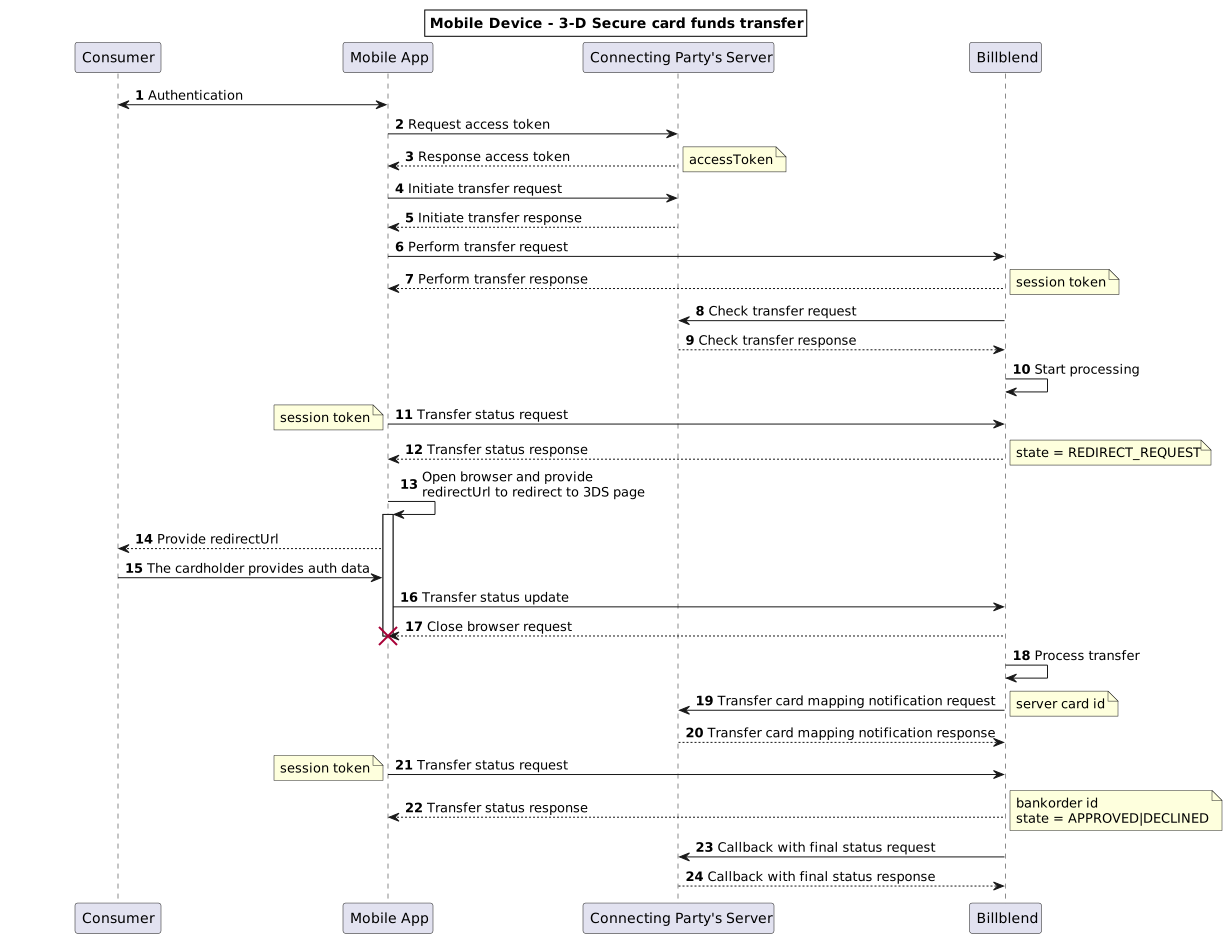
(1,2,3) To perform authentication of Consumer in Connecting Party’s app, Connecting Party can use any method which fits best to their needs. As a result, Connecting Party’s server generates {accessToken} and provides it to Connecting Party’s app. This parameter will be used to start and continue session.
(4,5) To initiate funds transfer, Connecting Party’s app sends {accessToken} with transaction amount and other device parameters to Connecting Party’s server, which are used to start a session with unique random {nonce} and encrypted {signature}. To initiate transfer request see Initiate Transfer.
(6,7) On this stage Connecting Party’s app sends cardholder, device, session data and other parameters straight to Billblend to perform funds transfer from card to card. To implement perform transfer request see Perform Transfer.
(8,9) Check transfer is used for security purposes and allows Billblend to compare the data sent by Connecting Party’s app with the data stored on Connecting Party’s server. To implement check transfer request see Check Transfer.
(11,12,21,22) Funds transfer status request is made by Connecting Party’s app to Billblend to get the status of transfer transaction. To implement transfer status request see Status Transfer.
(19,20) Billblend sends Transfer card mapping notification request to Connecting Party’s server/proxy with created on its side card reference – {serverCardId}. To implement transfer card mapping notification request see Transfer card mapping notification.
(23,24) Connecting Party specified a callback URL, Payment Gateway sends message to the callback URL whenever transaction reaches final status, no matter if the result is approved, declined or other final status. See more Callbacks.
Repeat Transfer Flow
After successful Card mapping procedure, new transfers with the same cardholder data can be done easier for Consumer.
Connecting Party’s app makes new transfer requests using {clientCardId} instead of source and/or destination cardholder data. Billblend sends these {clientCardId} to Connecting Party’s server in “Check transfer request” and gets mapped to it {serverCardId} in “Check transfer response” from Connecting Party’s server. These {serverCardId} are used to continue the processing of transfer transaction.
Transaction flow remains the same: Initiate Transfer -> Perform Transfer -> Check Transfer.
If there is no need to change Consumer’s data (such as address, phone, etc.), “Perform transfer request” for Repeat transfer may be sent without any optional parameters and with card references for sender and receiver instead of cardholder data. If Consumer’s data has to be changed, new source card reference must be created.
If source and/or destination {clientCardId} are used in “Perform transfer request”, source and/or destination {serverCardId} must be included in “Transfer check response” and signature.
If source {clientCardId} was mapped to {serverCardId} in transaction with included {consumer.email} value, new “Perform transfer request” and “Check signature response” with this {clientCardId} must also contain the same {consumer.email} value.
For Repeat Transfer Flow use the following source of funds parameters in Perform Transfer request:
- {sourceOfFunds.reference.clientCardId}
- {sourceOfFunds.reference.securityCode}
Instead of:
- {sourceOfFunds.card.expiry.month}
- {sourceOfFunds.card.expiry.year}
- {sourceOfFunds.card.holder}
- {sourceOfFunds.card.holder.firstName}
- {sourceOfFunds.card.holder.lastName}
- {sourceOfFunds.card.number}
- {sourceOfFunds.card.securityCode}
For destination of funds use {destinationOfFunds.reference.clientCardId} instead of {destinationOfFunds.card.number}.
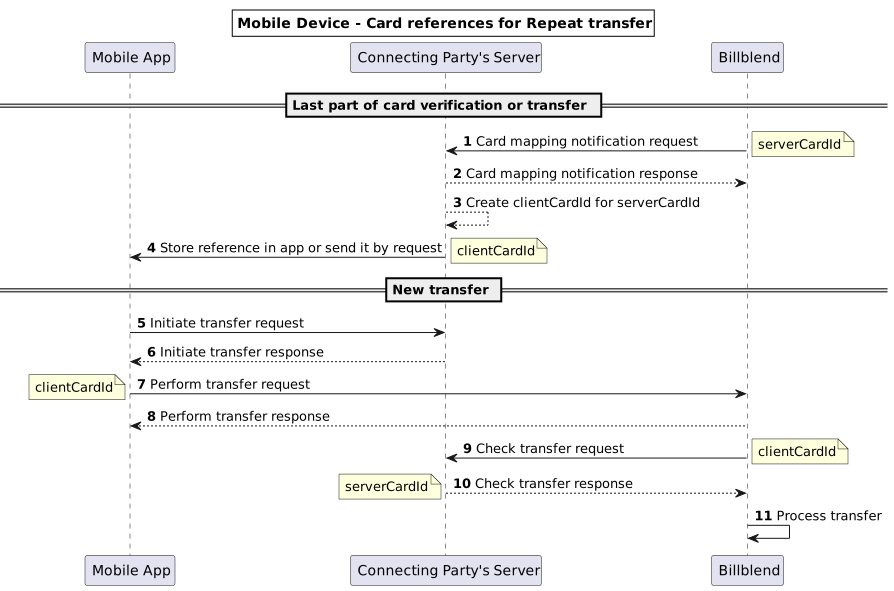
(1,2) Billblend sends Transfer card mapping notification request to Connecting Party’s server/proxy with created on its side card reference – {serverCardId}. To implement transfer card mapping notification request see Transfer card mapping notification.
(5,6) To initiate funds transfer, Connecting Party’s app sends {accessToken} with transaction amount and other device parameters to Connecting Party’s server, which are used to start a session with unique random {nonce} and encrypted {signature}. To initiate transfer transfer request see Initiate Transfer.
(7,8) On this stage Connecting Party’s app sends cardholder, device, session data and other parameters straight to Billblend to perform funds transfer from card to card. To implement perform transfer request see Perform Transfer.
(9,10) Check transfer is used for security purposes and allows Billblend to compare the data sent by Connecting Party’s app with the data stored on Connecting Party’s server. To implement check transfer request see Check Transfer.
Consumer Defined Transfer Rates Flow
Consumer defined transfer rates is an optional feature which allows the sender to choose the most suitable commission amount for his transfer transaction between several available payment provider gates.
The possibility of such feature depends on the integration. Please ask support manager for details.
When such feature is enabled, the Transfer Flow extends:
- If Check transfer has been successful, Billblend pauses the processing, includes the list of possible commissions to next Transfer status response and awaits for confirmation from the Consumer.
- Consumer selects the most suitable commission from the list in the Connecting Party’s app.
- Connecting Party’s app sends the selected gate (using its assignedId aliased name) in Complete transfer request to Billblend.
- Billblend continues to process the transaction on the selected gate.
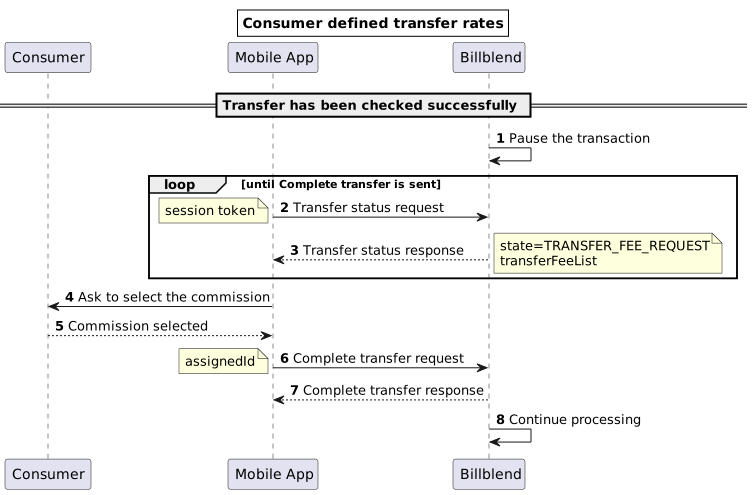
(2,3) Funds transfer status request is made by Connecting Party’s app to Billblend to get the status of transfer transaction. To implement transfer status request see Status Transfer. Transfer status response includes the state parameter with TRANSFER_FEE_REQUEST value and the transferFeeList object with a list of commissions for possible processing gates. Each processing gate is represented by it’s own aliased name in assignedId parameter. TRANSFER_FEE_REQUEST value in state parameter exists only in “Consumer defined transfer rates” flow. The mentioned parameters may not be presented in first Transfer status response, so Connecting Party’s app should continue polling the transaction status. When the transaction reaches TRANSFER_FEE_REQUEST state, the processing will remain paused until Complete transfer request is sent.
(6,7) To implement Complete transfer request see Complete transfer.