

Accepting online payments is no longer “nice to have.” It’s the infrastructure that decides whether customers trust your checkout, whether revenue arrives on time, and whether your operations scale without chaos. In 2026, the winners are businesses that treat payments as a system: methods, security, fees, retries, reporting, and customer experience – working together.
This guide explains how to design a modern setup to accept online payments, choose the right methods for your audience, and avoid the common pitfalls that cause failed checkouts, disputes, and hidden costs.
Why Your Business Needs Online Payments
Customers expect to buy instantly, from any device, with their preferred method – cards, bank rails, or mobile options. When a checkout forces extra steps or lacks familiar choices, shoppers abandon the purchase.
Online acceptance also changes what your business can do operationally:
- Sell globally without opening local offices
- Automate billing and reduce manual work in finance
- Accelerate cash flow with faster authorization and settlement visibility
- Collect cleaner data for reconciliation, analytics, and forecasting
If your product is digital, subscription-based, or cross-border, a reliable payment layer becomes a growth requirement – not a feature.
Key Benefits of Accepting Payments Online
Better conversion and customer experience
A shorter checkout flow reduces friction, especially on mobile devices. The right mix of methods can raise completion rates without changing pricing or marketing.
Faster operations and fewer errors
Automation reduces human mistakes (copying invoices, matching transfers, tracking partial payments). It also lowers support volume because customers can pay and confirm instantly.
Scalable monetization
A solid foundation supports ecommerce payment processing, one-time purchases, recurring billing online, and hybrid models (subscriptions + add-ons) without re-platforming.
Choosing Payment Methods Based on Business Model
The way you take payment online should reflect how your business operates, not what competitors happen to use.
- For ecommerce stores
Online card payments and digital wallets should form the foundation, supported by BNPL for higher-value purchases. Speed and simplicity matter more than advanced customization. - For subscription and SaaS businesses
Recurring billing reliability is critical. Failed payments directly cause churn, so retry logic and card updater tools matter more than the number of methods offered. - For service providers and consultants
Payment links and invoices are often the fastest way to receive payments online without investing in a full checkout flow. - For marketplaces and platforms
You’ll need split payments, payout scheduling, and clear reporting – features that go beyond basic processing.
Aligning methods with your model reduces friction for both customers and internal teams.
Common Mistakes When Accepting Payments Online
Many businesses rush to launch checkout without considering how payment choices affect conversion, costs, and customer trust. As a result, they technically accept online payments, but lose revenue in less obvious ways.
The most common mistakes include:
- Offering too many options at once
While flexibility matters, overwhelming customers with choices can slow decision-making and increase abandonment. - Ignoring mobile behavior
Desktop-first checkout flows perform poorly on smartphones, even if traffic is mobile-heavy. - Treating payments as “set and forget”
Authorization rates, fraud rules, and retry logic need regular review. - Optimizing only for fees
The cheapest processing option is rarely the most profitable once conversion loss and support overhead are considered.
Avoiding these mistakes early makes it easier to scale without reworking your entire payment stack.
Guest Checkout and Conversion Optimization
One of the simplest ways to improve checkout performance is allowing customers to pay without creating an account. Guest checkout removes friction at the most sensitive moment of the transaction.
Businesses that focus on fast authorization and minimal form fields consistently get payments online more efficiently than those forcing registration upfront.
Key optimization principles include:
- minimize required fields,
- auto-detect card type and country,
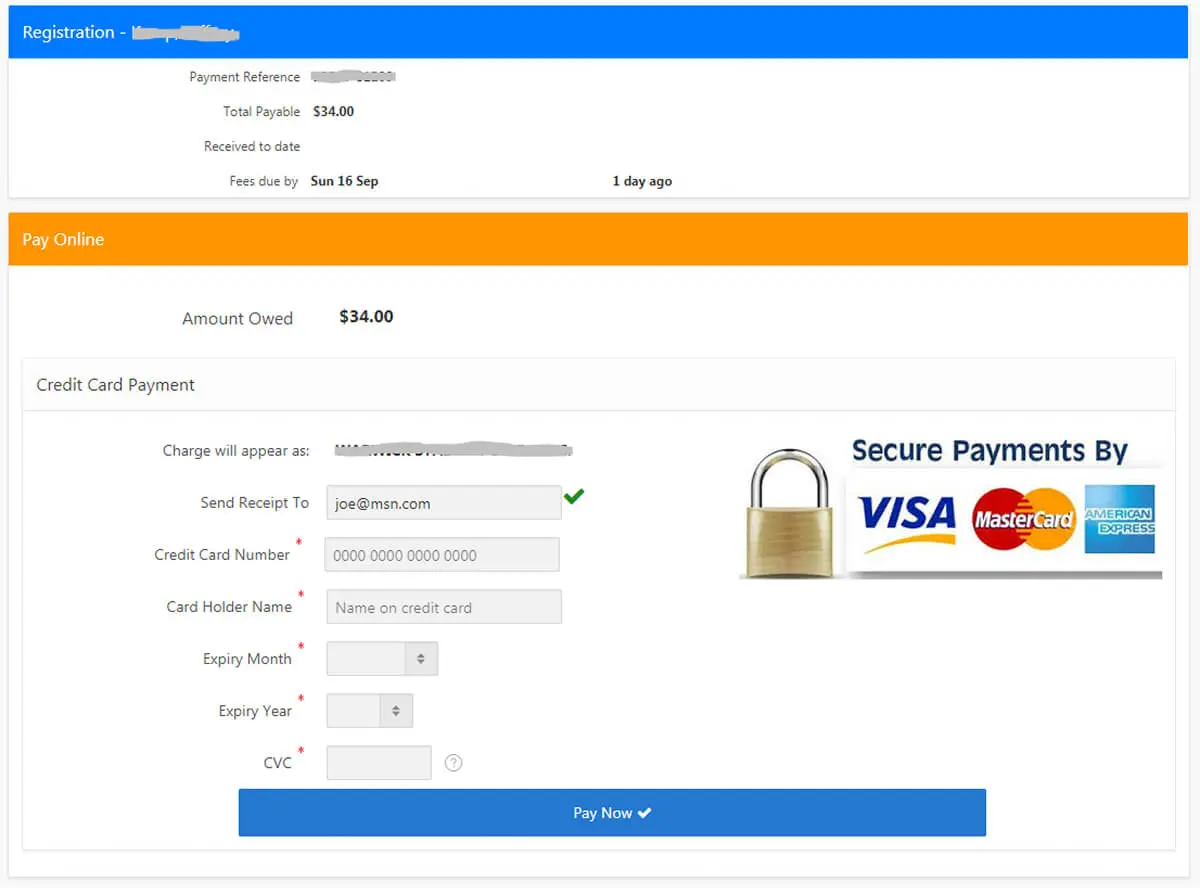
- clearly show security signals,
- confirm success instantly.
These changes often deliver larger gains than adding new payment methods.
Market Snapshot: What’s Changing (2024–2027)
Two macro trends matter for merchants:
- Wallet adoption keeps growing. Worldpay projects digital wallets will reach $25T+ in global transaction value by 2027 and represent 49% of online + POS sales value.
- Ecommerce continues expanding. Shopify’s industry summary forecasts global ecommerce sales rising from $6.42T (2025) to $7.89T (2028), with 2026 at ~$6.88T and ~21.1% of total retail.
Practical takeaway: if you don’t support mobile payment options and local preferences, you’re competing with a handicap.
Getting Started: A Practical Setup Checklist
Think of payment gateway setup as a staged rollout – coverage first, then optimization.
- Define requirements (business model + geography)
Are you ecommerce, subscriptions, services/invoicing, or a platform? Do you need global payment acceptance (multi-currency, local methods)? - Pick an integration approach
- Hosted checkout (fastest time to launch; lower PCI scope)
- Embedded components/APIs (more control; more engineering)
- Payment links & invoices (great for services and quick selling)
- Enable core methods
Start with credit card acceptance online plus at least one wallet and one “low-friction” option for your audience. - Add security controls Tokenization
, 3DS where needed, risk rules, and monitoring for secure online transactions. - Test edge cases Declines
, partial refunds, recurring failures, disputes, and currency conversions – before you scale spend.
Stripe’s quick-start guidance aligns with this “requirements → processor → integration → testing” approach.
Online Payment Methods: What to Offer (and Why)
1) Cards (credit/debit)
Still essential for broad coverage. They’re familiar, fast to authorize, and support subscriptions. Downsides include processing fees and chargebacks.
2) Digital wallets (Apple Pay, Google Pay, PayPal)
Wallets reduce typing, speed up mobile checkout, and often improve conversion. PayPal highlights wallet and alternative method coverage (including Apple Pay where available) across checkout options.
3) Bank transfers / A2A
Good for high-value B2B or low-fee preferences. Confirmation can be slower, and fraud patterns differ from card rails.
4) BNPL
BNPL for small business can boost conversion and order value for retail – at the cost of extra fees and more complex reconciliation.
5) Payment links & invoices
PayPal and Stripe both emphasize “sell without a website” styles of links/buttons for quick collection. This is ideal when you don’t want to build a full checkout yet.
6) In-person “tap to pay” add-on (optional)
If you’re hybrid (online + offline), solutions like phone-based tap-to-pay can unify experiences. PayPal describes turning a phone into a contactless terminal.

Comparison Table: Pros and Cons by Method
| Method | Pros | Cons | Best fit |
|---|---|---|---|
| Cards | Universal acceptance, subscriptions-friendly | Fees, chargebacks, fraud pressure | Most merchants |
| Wallets | Faster mobile checkout, fewer form fields | Device/region dependency | Mobile-heavy audiences |
| Bank transfer/A2A | Potentially lower fees | Slower confirmation, different fraud types | B2B, high-ticket |
| BNPL | Higher conversion and AOV | Extra costs, settlement complexity | Retail/ecommerce |
| Payment links | Fast launch, no dev-heavy build | Less control over UX | Services, early-stage |
| Crypto (optional) | Niche audience fit | Volatility, compliance complexity | Specialized markets |
Accepting International Payments: What Actually Breaks
Expanding globally introduces challenges that aren’t obvious at launch. Supporting multiple currencies alone isn’t enough.
Common international issues include:
- higher decline rates due to issuer rules,
- unfamiliar local payment preferences,
- currency conversion transparency,
- increased fraud exposure.
For cross-border sales, the best way to accept online payments is usually a mix of cards and regionally popular local methods, rather than a single universal solution.
Testing checkout behavior country by country helps uncover problems before they impact revenue.
Fees and Models: What You’re Really Paying For
Instead of chasing the “lowest rate,” evaluate total cost of ownership:
- Processing fees (percentage + fixed)
- Cross-border + FX
- Chargebacks/disputes
- Fraud tooling (built-in vs add-on)
- Engineering time (hosted vs custom)
Fast comparison: Hosted checkout vs fully custom
| Model | Strength | Trade-off |
|---|---|---|
| Hosted checkout | Speed, lower PCI burden | Less UI control |
| Embedded/API | Full UX control | More dev + compliance overhead |
| Links/invoices | Fastest to launch | Least branded experience |
This is why the “best way to accept online payments” depends on what you’re optimizing: speed to launch, conversion, or deep control.
Case Studies: What “Good” Looks Like in the Real World
Case 1: Mobile ordering & custom experiences (Square x Blue Bottle)
Square describes how Blue Bottle used developer tools (including an in-app payments SDK) to support a mobile pickup experience—showing how payments integrate into product UX, not just checkout.
Lesson: if your value is speed and convenience, optimize the payment flow inside the customer journey (mobile order, pickup, repeat purchase)..
Case 2: Scale across hundreds of locations (Square x HOTWORX)
Square’s materials highlight HOTWORX integrating Square into a custom POS to process omnichannel transactions at 500+ locations, supporting scale and consistency.
Lesson: unified reporting + consistent acceptance matters more as locations/channels grow.
Case 3: “No-code” collection for services
Payment links are a proven shortcut for service businesses: you can send a link via email/SMS and collect fast without building a full store. PayPal’s Payment Links page positions this as “website optional,” with multiple methods supported.
Lesson: the fastest way to receive payment online can be links/invoices – especially for B2B and services..
Payment Costs and Business Economics

Payment fees are often discussed in isolation, but their real impact is felt through margins and lifetime value.
While many platforms advertise models that feel like accept payments online free, costs still appear through:
- per-transaction fees,
- currency conversion margins,
- chargebacks and disputes,
- engineering and support time.
The best way to receive payment online is the option that maximizes net revenue, not the one with the lowest visible rate.
Security and Compliance: The Non-Negotiables
A modern setup should cover:
- PCI DSS compliance: reduce scope by using hosted fields/checkout when possible
- Tokenization + encryption
- Risk scoring, rules, and monitoring
- Dispute flows (chargebacks, refunds, partial refunds)
Also note that A2A growth increases attention from fraudsters; Visa cites Juniper Research projecting A2A value growth from $1.7T (2024) to $5.7T (2029) and notes fraud risks in that area.
Practical recommendation: treat security as an operating system, not a checkbox—review rules, velocity limits, and payout controls monthly.
Optimization: How to Improve Results After Launch
Once you’re live, focus on measurable levers:
- Reduce checkout fields; enable guest flows where possible
- Add e-wallet integration for mobile conversion
- Use smart retries for recurring billing online
- Track decline reasons and tune routing/risk
- Offer local methods for global payment acceptance
- Make refund and support workflows fast and visible
Trends 2026+: What to Prepare For
1) Mobile wallets becoming the default
Wallet share projections suggest continued dominance; prepare by optimizing wallet placement and mobile UX.
2) AI in fraud and authorization
AI-driven risk control is increasingly standard. The goal is fewer false declines (lost revenue) and fewer successful fraud attempts.
3) More “sell anywhere” formats
Payment links, embedded checkout, social commerce, and in-app flows keep expanding as businesses move beyond a single “website checkout” model.
Suggested Images to Add (to fix “no visuals”)
Add 3–5 simple visuals with captions (even if they’re branded illustrations):
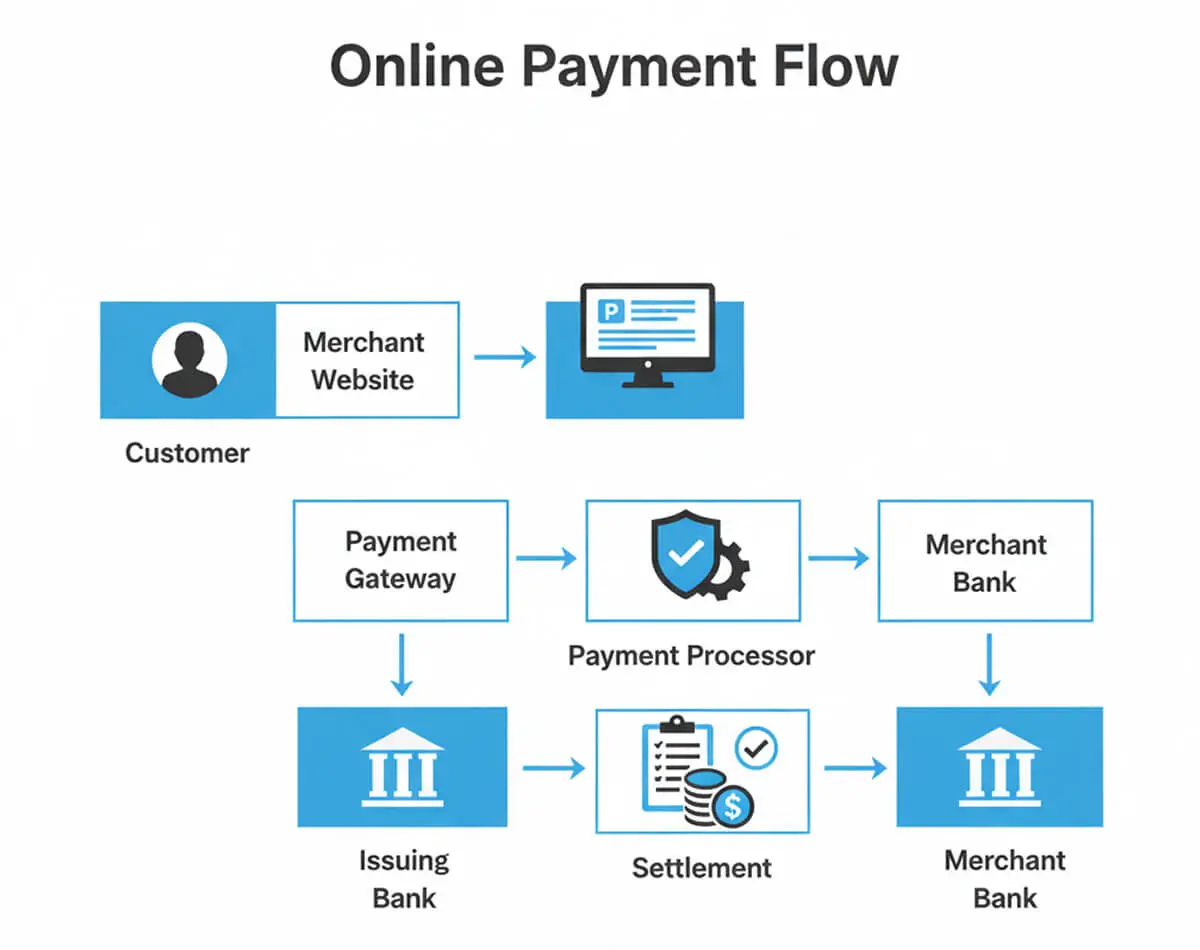
- “Payment flow diagram”
Caption: From checkout → gateway → processor → confirmation → reconciliation. - “Methods comparison table”
(reuse the pros/cons table visually) - “Setup checklist graphic”
Caption: Coverage → Reliability → Optimization. - “Fraud & compliance stack”
Caption: Tokenization, monitoring, PCI scope, dispute handling.
Online Payments for Small Businesses: Practical Priorities
For early-stage companies and solo founders, complexity is the enemy of progress. The goal of accepting payments online small business owners rely on is simple: get paid quickly, reliably, and with minimal setup.
A practical starting stack usually includes:
- cards,
- one wallet option,
- payment links or invoices.
Advanced features can be added later, once volume and needs justify them.
Final Takeaway
A high-performing online payment system is not “a button.” It’s method selection, cost control, security, retries, and reporting – all aligned with your business model. If you’re choosing a stack today, focus on what improves conversion and reduces operational drag, not just what looks cheapest.
If you want the best way to receive payment online for your exact model, start with your checkout context (mobile vs desktop, subscription vs one-off, local vs cross-border) and build from there.
For businesses that need a tailored, scalable payment gateway, you can leave a request for a consultation to explore how BillBlend can be connected as part of your payment infrastructure.
FAQ
What is the best way to accept payments online for free?
There’s no truly free processing – networks and providers charge fees. But many platforms have no setup or monthly fees, so you effectively pay only when transactions happen. That’s why some businesses describe it as accept payments online free (in the sense of no fixed upfront cost).
Is there a truly free option?
Not in practice. Every payment method involves infrastructure costs, whether through card network fees, bank rails, or wallet providers. The most cost-efficient approach is to choose a solution with transparent, usage-based pricing and no long-term commitments, so fees scale only with your actual transaction volume.
How to accept international payments?
Enable multi-currency, local methods, and clear FX disclosure. Choose a provider with strong global payment acceptance and localized checkout.
Is it safe to accept credit cards online?
Yes – if you use a PCI-aligned setup with tokenization/encryption, monitoring, and a mature dispute workflow.
Which gateway for international sales in 2026?
In 2026, the best gateways for international sales are those that combine global card coverage, regional payment methods, intelligent routing, and built-in compliance support. The right choice depends on where your customers are located, how you price in different currencies, and whether you need support for subscriptions, marketplaces, or high-risk verticals.
Do I need a payment gateway?
In most cases, yes – either as a separate gateway or bundled into a processor/platform. The right payment gateway setup can lower your compliance burden and reduce engineering time.
Which methods should a small business start with?
Start with cards + one wallet + payment links/invoicing. This usually covers most needs before you add BNPL or bank rails.